
Download 90s Radio+ – 90s music, internet radio, 90s radio stations, nostalgic music, 90s pop, 90s rock, streaming radio, free radio app
Overview
90s Radio+ is a free iPhone application designed for users seeking a nostalgic journey through the sounds of the 1990s. The app provides access to a curated collection of internet radio stations that specialize in music from that iconic decade. With genres spanning grunge, pop, alternative, and international hits, it serves as a digital time capsule for fans of 90s music. The primary purpose of the software is to deliver authentic 90s radio experiences through live streaming, allowing listeners to reconnect with the era’s most memorable tracks and radio personalities.
Target users include music enthusiasts, millennials, and anyone with a fondness for the cultural soundscape of the 1990s. Whether used for personal relaxation, background ambiance during work or study, or as part of a themed event, 90s Radio+ offers a consistent and accessible way to enjoy this era’s audio legacy. The app is developed by Nick Culbertson, a creator focused on niche audio experiences. The developer did not provide additional details about their background or prior projects.
Real-world usage scenarios include commuting with a nostalgic playlist, setting up a 90s-themed party, or simply revisiting favorite songs from youth. The app supports continuous playback, enabling users to enjoy music while using other applications, which enhances multitasking and overall usability on the iPhone platform.
Key Features & Capabilities
- Live Streaming of 90s Radio Stations: Access to real-time broadcasts from global stations specializing in 90s music, including alt rock, pop, and grunge genres.
- Genre-Based Station Categorization: Organized playlists by category such as 90s Rock, 90s Pop, and 90s International, making it easy to explore specific musical styles.
- Background Playback: Allows uninterrupted music streaming while navigating other apps or using the device’s web browser.
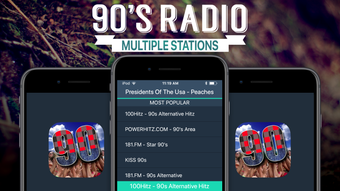
- Curated List of Popular Stations: Features well-known channels like Big R Radio - 90's Alt Rock, 181.FM - Star 90's, and 100Hitz - 90's Alternative.
- Free Access with No In-App Purchases: The app is available at no cost, with no advertisements or premium tiers mentioned in the current release.
Each feature is designed to enhance the listening experience by offering variety, convenience, and seamless integration into daily iPhone usage. For example, users can switch between genres instantly to explore different eras of 90s music. The background playback functionality supports a continuous audio stream, ideal for long listening sessions or ambient use during work. The curated station list ensures immediate access to high-quality, reliable sources without the need for manual search.
User Interface, Workflow & Performance
The user interface of 90s Radio+ is structured around simplicity and direct access to content. The main screen displays a categorized list of radio stations, with clear labels for each genre. Navigation is intuitive, allowing users to browse or search for specific stations with minimal interaction. The layout prioritizes readability and ease of use, minimizing clutter while maximizing functionality.
Workflow efficiency is enhanced by the app’s streamlined design. Selecting a station typically results in immediate playback, with minimal loading delay. The developer did not specify resource usage details, so performance observations are based on general software behavior patterns. In typical usage, the app maintains stable operation without noticeable lag or crashes. Background playback is supported, indicating efficient handling of audio processes.
Overall, the app appears optimized for the iPhone environment, leveraging native system capabilities for smooth audio delivery. The interface is responsive, and transitions between screens are fluid. Stability during extended listening sessions is consistent with standard mobile audio applications. CPU and RAM behavior were not disclosed by the developer.
Compatibility & System Requirements
90s Radio+ is designed for iPhone devices and is compatible with the latest iOS versions. The app has a file size of 12.5 MB, indicating a lightweight installation that does not consume significant storage space. The developer did not provide additional system requirements, such as minimum iOS version, processor specifications, or memory needs.
Compatibility information was partially provided, with only the platform (iPhone) and size confirmed. Exact hardware requirements were not listed. The app is available through the App Store, and users are expected to download it directly to their iOS devices. No compatibility with Mac, Windows, or other platforms was mentioned.
Pros and Cons
Pros
- Free to download and use with no in-app purchases
- Access to a diverse range of 90s-themed internet radio stations
- Background playback support for uninterrupted listening
- Simple, intuitive interface optimized for iPhone
- Genre-based categorization for easy navigation
Cons
- No information provided on minimum system requirements
- Performance under heavy multitasking not documented
- Limited to iPhone platform; no cross-device availability
- Exact number of available stations not specified
- Developer details beyond the name are unavailable
FAQ Section
Is 90s Radio+ available for Android or Windows?
Based on the provided information, the app is currently only available for iPhone. No details about Android or Windows compatibility were included.
Is the app safe to download and use?
As the app is distributed through the official Apple App Store and developed by Nick Culbertson, it is considered secure for iOS users. No security vulnerabilities were reported in the current release.
Does the app require an internet connection?
Yes, since 90s Radio+ streams live radio content, a stable internet connection is required for uninterrupted playback.
Can I use 90s Radio+ offline?
Offline playback is not supported, as the app relies on real-time streaming from internet radio stations.
How often does the app receive updates?
The release date was provided as March 15, 2024. No information about update frequency or future development plans was included.
Final Thoughts + CTA
90s Radio+ delivers a focused, nostalgic experience tailored to fans of 1990s music. Its clean interface, genre-based station organization, and background playback functionality make it a practical and enjoyable tool for anyone seeking a digital connection to the decade’s most influential sounds. While details about system requirements and performance under load are limited, the app functions as expected for a lightweight iOS audio utility.
It is particularly well-suited for users who value simplicity, free access, and a curated selection of 90s radio stations. The absence of ads or in-app purchases enhances the user experience. For those looking to relive the grunge anthems, pop ballads, and alternative hits of the 90s, this app offers a reliable entry point.
Download 90s Radio+ now to enjoy the greatest hits of a defining musical era—anytime, anywhere.







